New Feature
New: Focus Mode for Security Questionnaires
Review and approve answers one question at a time — with full context, sources, and commenting. No more scrolling through hundreds of rows.
By Secreply TeamMay 20254 min read
The problem with long questionnaires
Security questionnaires can have 50, 100, or even 300+ questions. Reviewing AI-generated answers in a spreadsheet-style view means endless scrolling, losing context, and accidentally skipping questions. You need a better way to focus.
Introducing Focus Mode
Focus Mode presents one question at a time in a clean, distraction-free view. For each question you see the AI-generated answer, the confidence score, the knowledge base sources it drew from, and a comment thread for team discussion. Navigate with Prev and Next buttons, or jump back to the full overview at any time.
See it in action
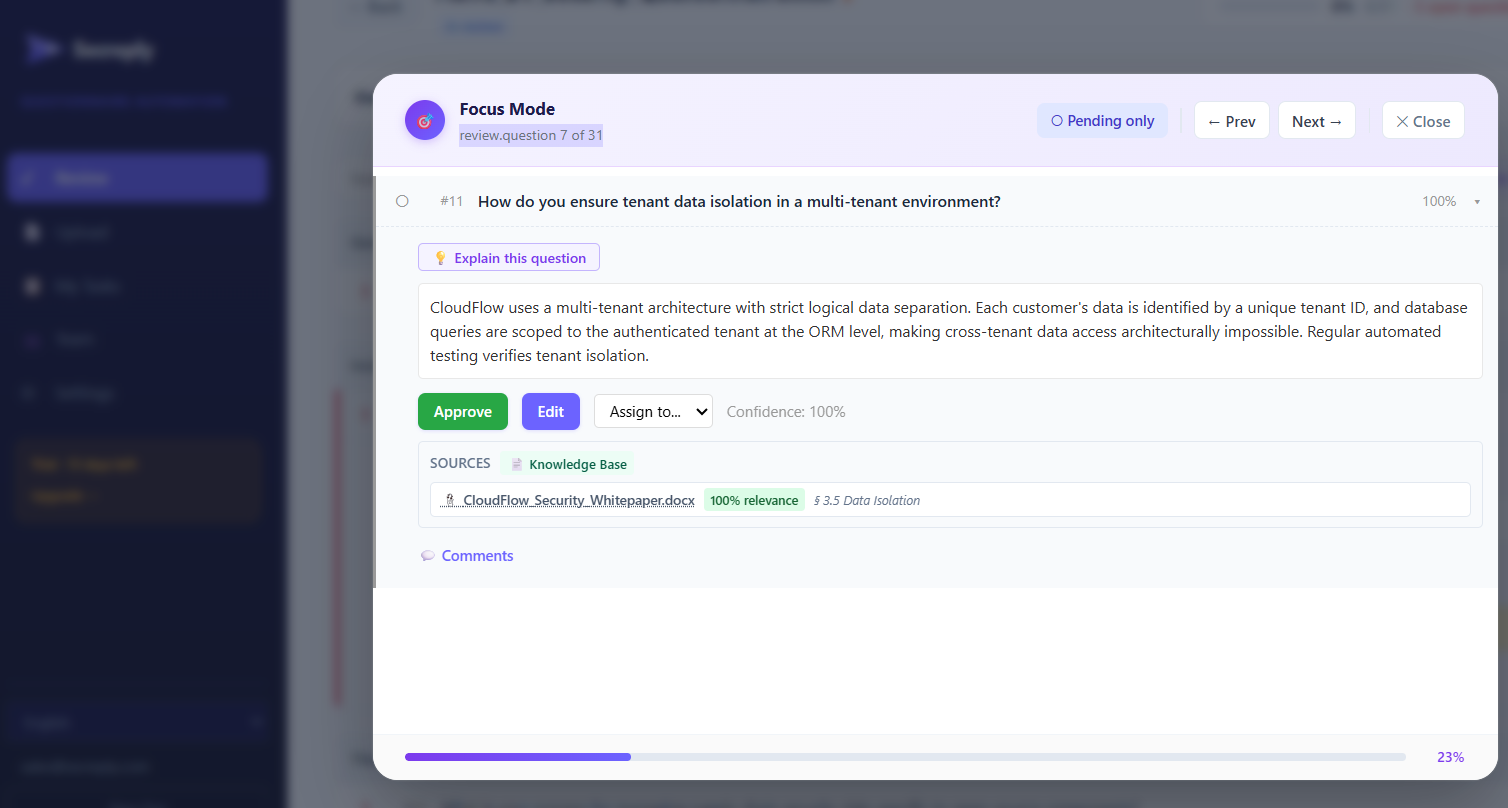
What you can do in Focus Mode
- Review one question at a time — no distractions from other questions
- Edit the answer — refine AI-generated text before approving
- Check sources — see which knowledge base documents contributed
- Add comments — leave notes for colleagues or flag for review
- Approve or assign — approve instantly or forward to a domain expert
- Navigate quickly — move through questions with Prev/Next buttons